
Give your AI assistant the routing table and registries.
pWhoIs MCP puts the resources of Prefix WhoIs inside Claude, Cursor and any model context protocol (“MCP”) client. Ask who announces an address, what an AS originates, or who is knocking in a log, and the assistant answers from the live global BGP table, enriched with registry and geo data. The same service we have run since 2005. Connect once. No account, no email, no API key. And private: like the whois service itself, we do not keep what you ask about.
Connect once. Ask forever.
Add the connector from your assistant. A page opens in your browser with a single Connect button. Press it and you are done.
- Open Settings, then Connectors.
- Choose Add custom connector.
- Paste
https://pwhois.org/mcp/and press Add. - Press Connect. A browser page opens; press Connect there too.
- Start a chat and ask about any address.
https://pwhois.org/mcp/- Open Settings, then Connectors. Connectors added to your claude.ai account appear here as well.
- Choose Add custom connector.
- Paste
https://pwhois.org/mcp/and press Add. - Press Connect and confirm on the page that opens.
- Ask your first question.
https://pwhois.org/mcp/- Run:
claude mcp add --transport http pwhois https://pwhois.org/mcp/ - Inside Claude Code, run
/mcpand pick pwhois to authenticate. - Press Connect on the page that opens.
- Ask: "Which AS announces 4.2.2.1?"
https://pwhois.org/mcp/- Open Settings, then MCP.
- Choose Add new MCP server.
- Set the type to Streamable HTTP.
- Enter the URL
https://pwhois.org/mcp/and save. - Press Connect on the page that opens.
https://pwhois.org/mcp/- Use any client that supports Streamable HTTP with OAuth.
- Add a server with the URL
https://pwhois.org/mcp/ - Complete the one-click Connect page when the client opens it.
- Call
pwhois_my_quotato confirm the connection and see your allowance.
https://pwhois.org/mcp/Example questions the MCP can answer.
Each tool costs a fixed number of queries from your daily allowance. The assistant sees the same costs, so it can plan a batch instead of guessing.
pwhois_lookup_ip1 queryOne address, the full record
Origin AS, most-specific prefix, AS path, organization, network name, country and route age for a single IPv4 or IPv6 address.
try “Who announces 45.148.10.77 and how long has that route existed?”
pwhois_lookup_ips1 per addressEnrich thousands of addresses at once
Thousands of addresses in one call, clustered by origin AS and country, so a log becomes a short list of networks. Full records for up to 500 at a time; summaries for up to 5,000; the assistant chains calls for more.
try “Who is knocking on port 22 in this log? Group by network.”
pwhois_asn_info1 queryWho an AS is
Organization, country and registration details for an autonomous system, and how many prefixes it originates right now.
try “What is AS27552 and where is it based?”
pwhois_asn_prefixes1 per familyWhat an AS originates
Every prefix the AS is announcing right now, IPv4 or IPv6, with AS paths.
try “List the IPv6 prefixes AS13335 originates.”
pwhois_asn_transit1 queryWhat passes through an AS
Prefixes seen transiting the AS, with each origin, for mapping upstreams and downstreams.
try “Which prefixes transit AS6939 in the current table?”
pwhois_prefix_routes1 queryRoutes covering a prefix
The active routes for a CIDR block: the best path, or every route-server view when you ask for all.
try “Show me the routes for 8.8.8.0/24 and who announces them.”
pwhois_org_search1 queryFind networks by name
Organizations on record whose name contains your text, with their AS numbers and announced prefixes.
try “Which ASes belong to organizations named Hurricane Electric?”
pwhois_registry_record1 queryThe filing beside the fact
The registry record for an organization ID, an AS number or a contact handle, with abuse and technical contacts.
try “Pull the registry record for AS3356 and give me the abuse contact.”
pwhois_map5 per chartDraw a network diagram
A picture of the routing around an address, prefix or AS: providers on the left, the network in the middle, downstream networks and prefixes on the right, with links to the interactive map.
try “Draw a network diagram of AS15169.”
pwhois_routing_statusfreeHow fresh the table is
Table size, peer count and when the current cache was built.
try “How current is the routing data you are using?”
pwhois_my_quotafreeWhat you have left
Remaining daily allowance for the address you are connecting from, and when it resets.
try “How many pwhois queries do I have left today?”
Network diagrams
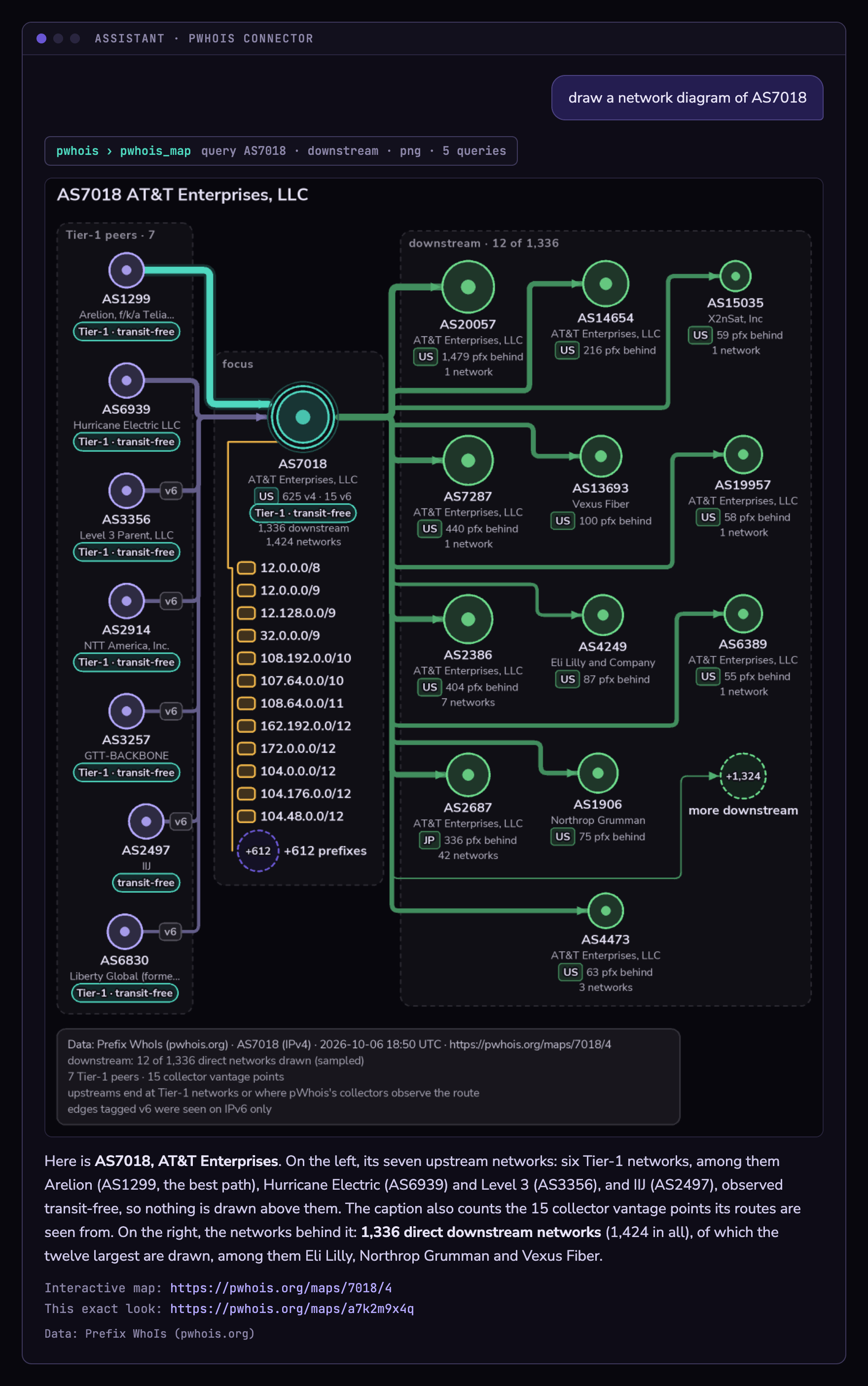
Ask for a picture and the assistant draws one. pwhois_map charts the routing around an address, a prefix or an AS from the live global table: providers on the left, the network at the centre, downstream networks and their prefixes on the right, every node labelled with the organization, country and size Prefix WhoIs has on record. The chart comes back as a PNG (SVG on request), with a link to the interactive map and a share link that reproduces the exact look. Collector vantage points, the networks through which pWhois’s route collectors see the routes, are counted in every chart caption and drawn only on request (collectors: true).
Ask in your own words
These all mean the same thing, and so do “map this ASN” and “show me a network diagram”. The assistant routes them to pwhois_map.
- “draw a network diagram of AS15169”
- “show me a network diagram for 8.8.8.8”
- “show me the BGP path to 2001:4860::/32”
- “display the network path for AS7018 including what’s behind it”
What you get
- What comes back: the picture, a one-line summary (networks, edges, and
sampledwhen a cap trimmed the data), the interactive map link (pwhois.org/maps/7018/4) and a share link (pwhois.org/maps/<id>) that opens the same chart with the same colours, font and layout. - Cost: 5 queries per chart from the same daily allowance as the other tools; the per-minute limit applies too. A failed chart, or an address with no route, costs nothing.
- Limits: width 640–2048 px. Large networks are trimmed to stay legible: the busiest neighbours, a dozen prefixes per network, and a bounded downstream fetch (at most 20,000 routes per family). When a cap cuts the data the answer says
sampled; the interactive map can load the full downstream cone. - Cached: maps are kept for 24 hours, so asking again asks the routing server nothing new.
Parameters
| name | values | default | meaning |
|---|---|---|---|
| query | string | required | An IPv4 or IPv6 address, a CIDR prefix, or an AS number (AS15169 or 15169). A hostname is resolved to its address first. |
| family | 4 or 6 | 4 | Which address family to draw for an AS. An address or prefix always uses its own. |
| downstream | true / false | true | For an AS: also draw the networks behind it: its direct downstream networks and the prefixes they bring. Ignored for addresses and prefixes. |
| collectors | boolean | false | Also draw the networks whose sessions feed pWhois’s route collectors; they show where routes are observed from, not who the network connects to. |
| preset | nightwire / phosphor / ember / paper / mono | nightwire | The colours. paper is light, for documents and print; mono is grayscale. |
| width | 640–2048 | 1200 | Image width in pixels. The height follows the drawing. |
| format | png / svg | png | PNG by default; SVG on request (format: svg). |
| font | Nunito Sans / JetBrains Mono | Nunito Sans | The label font. |
Five looks
Pass preset to pick one. The same palettes as the interactive map.
Three real charts
Drawn by the same renderer the connector uses, from the live table. Select a chart to open it full size.
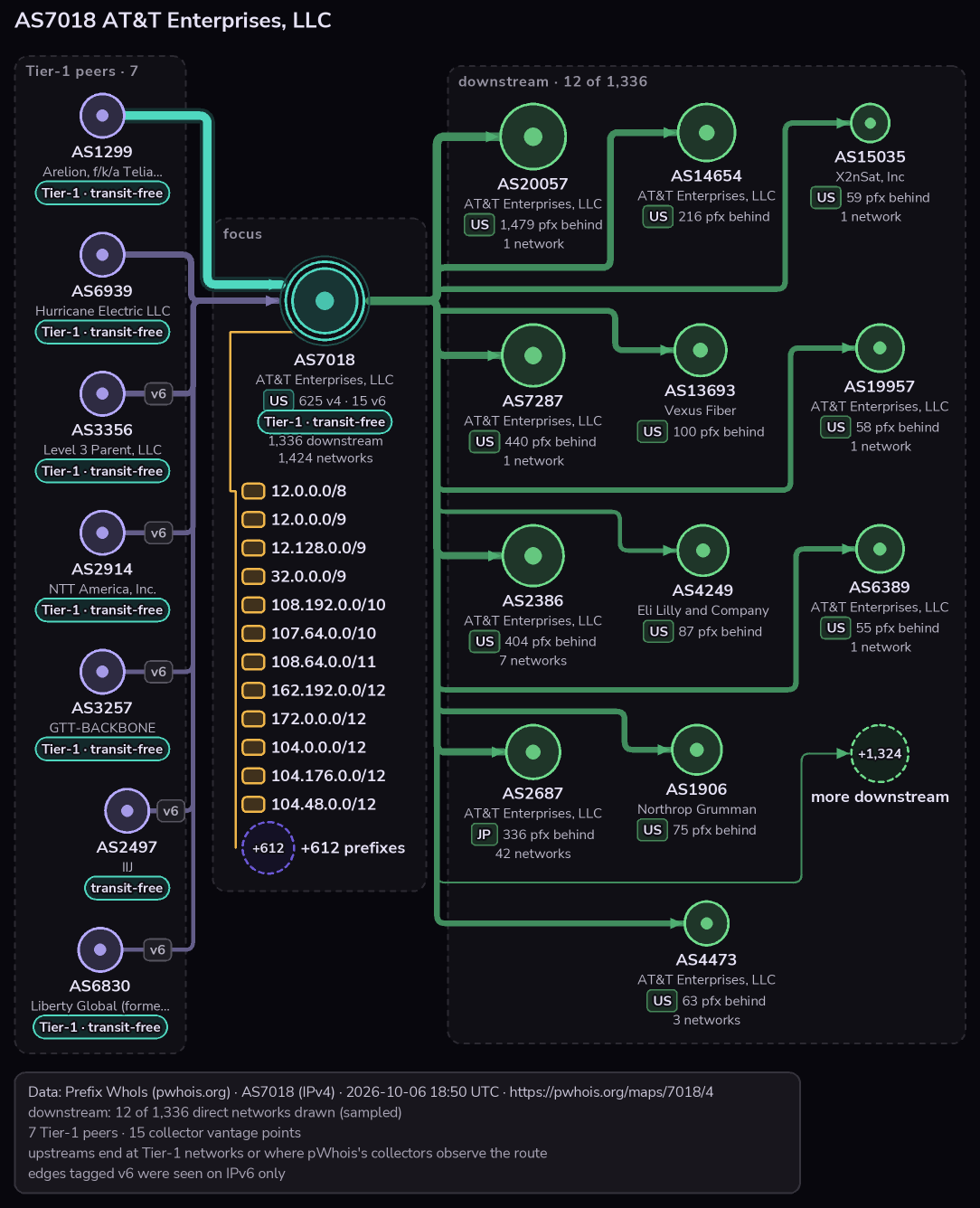
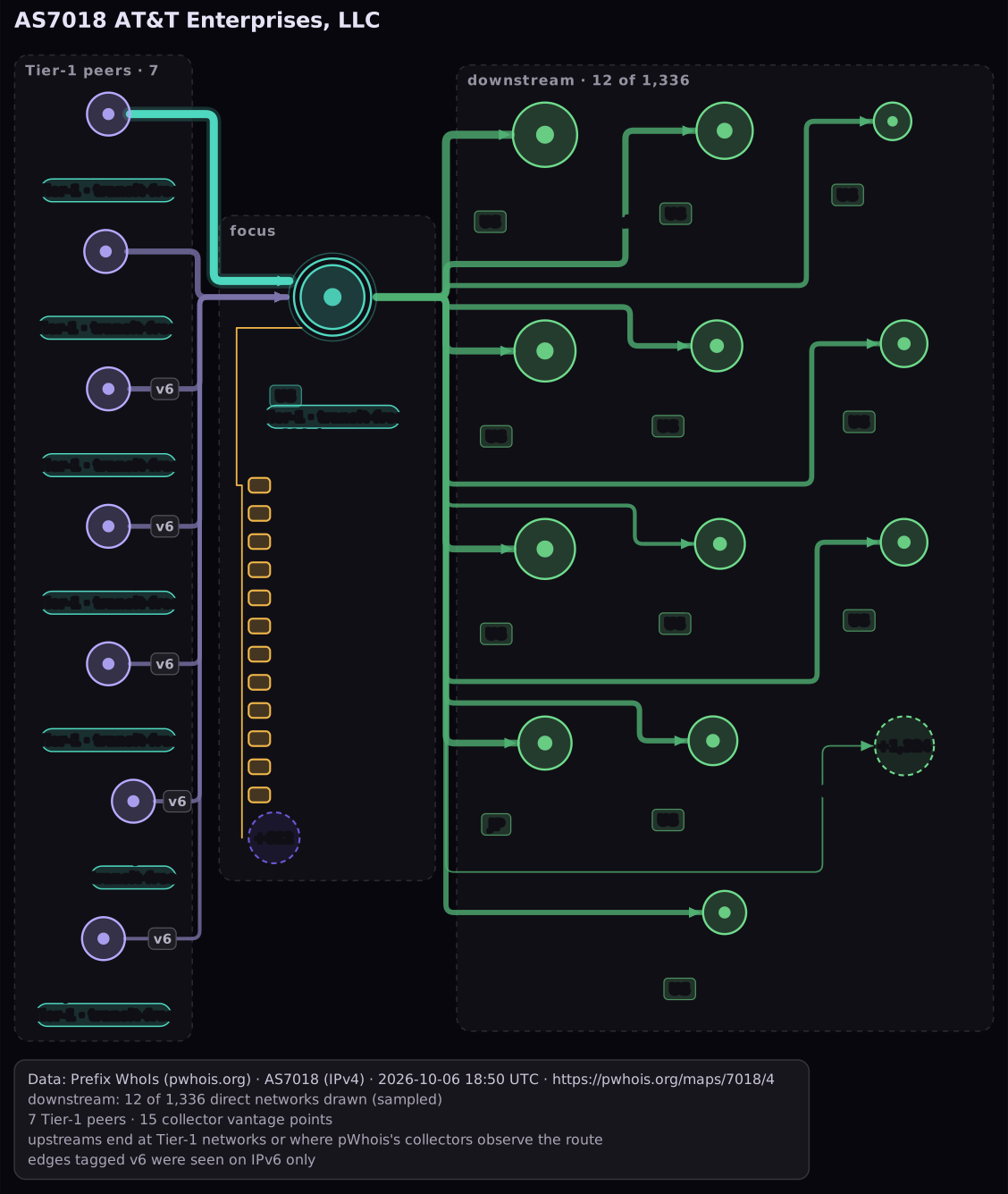
Its seven upstream networks on the left under “Tier-1 peers · 7” (six on VOSTROM’s Tier-1 list and IIJ, observed transit-free), so nothing is drawn above them; AT&T in the middle with its prefixes; and the twelve largest of 1,336 direct downstream networks on the right, with “+1,324 more downstream”. The caption counts 15 collector vantage points. This is the IPv4 view, so edges tagged v6 were seen on IPv6 only. Real data from whois.pwhois.org, drawn by the MCP renderer on 6 October 2026 (nightwire). Open full size · SVG · Interactive map
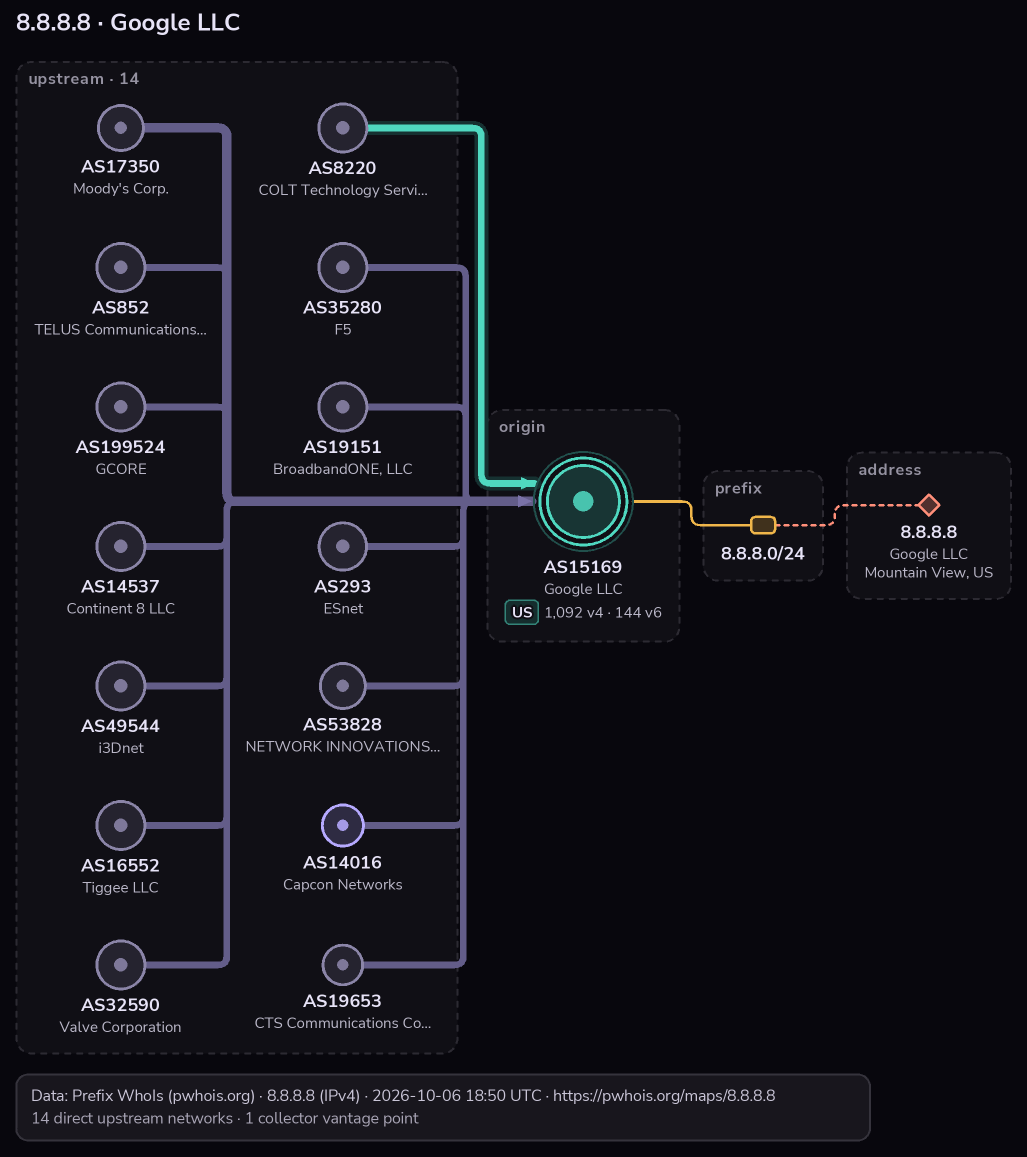
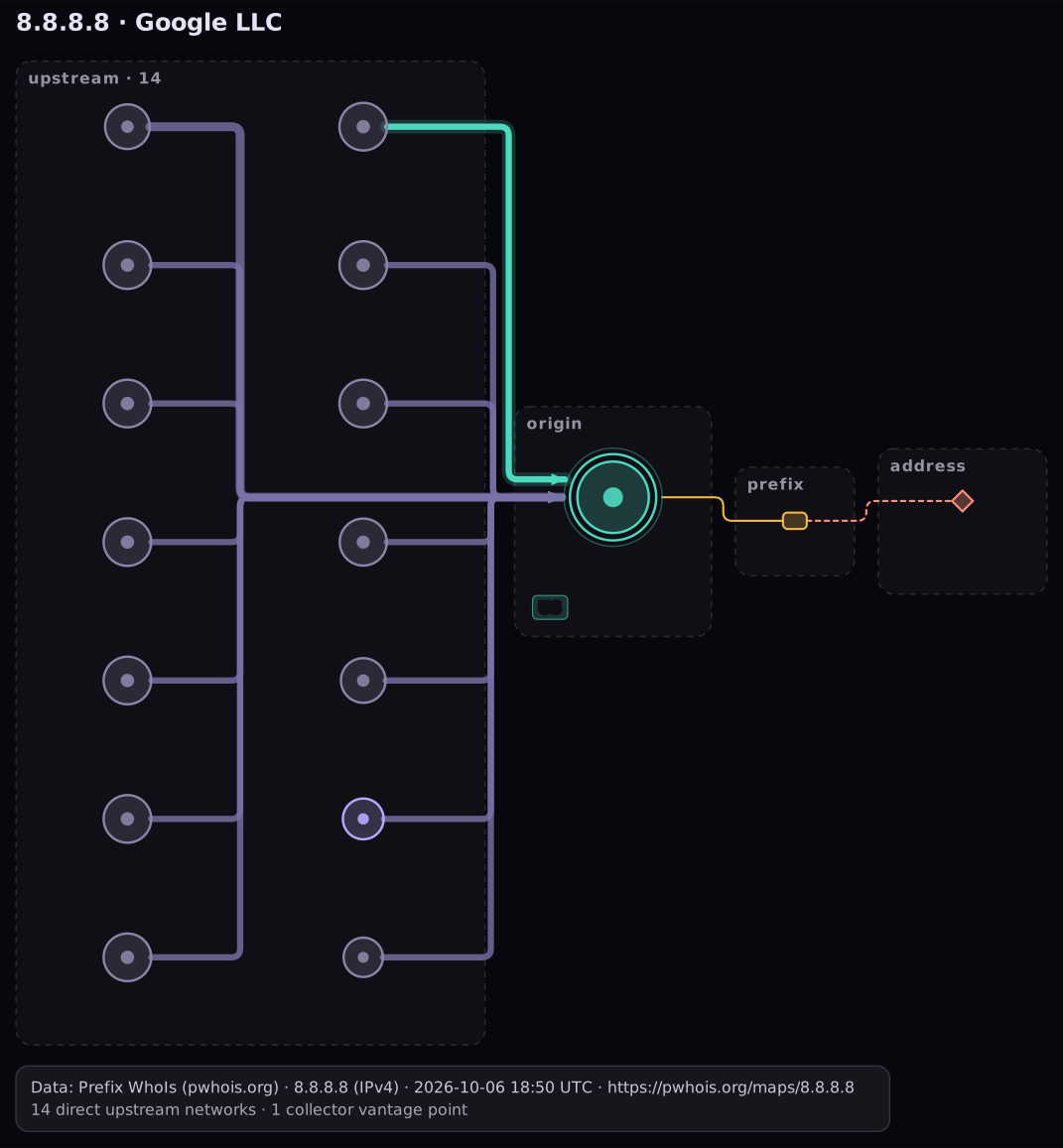
All fourteen direct upstream networks that carry the route, in two sub-columns, with the best path (via COLT, AS8220) in teal; then the origin AS (Google), the covering prefix and the address. None of these providers is on the Tier-1 list; the caption counts one collector vantage point. Real data from whois.pwhois.org, drawn by the MCP renderer on 6 October 2026 (nightwire). Open full size · SVG · Interactive map
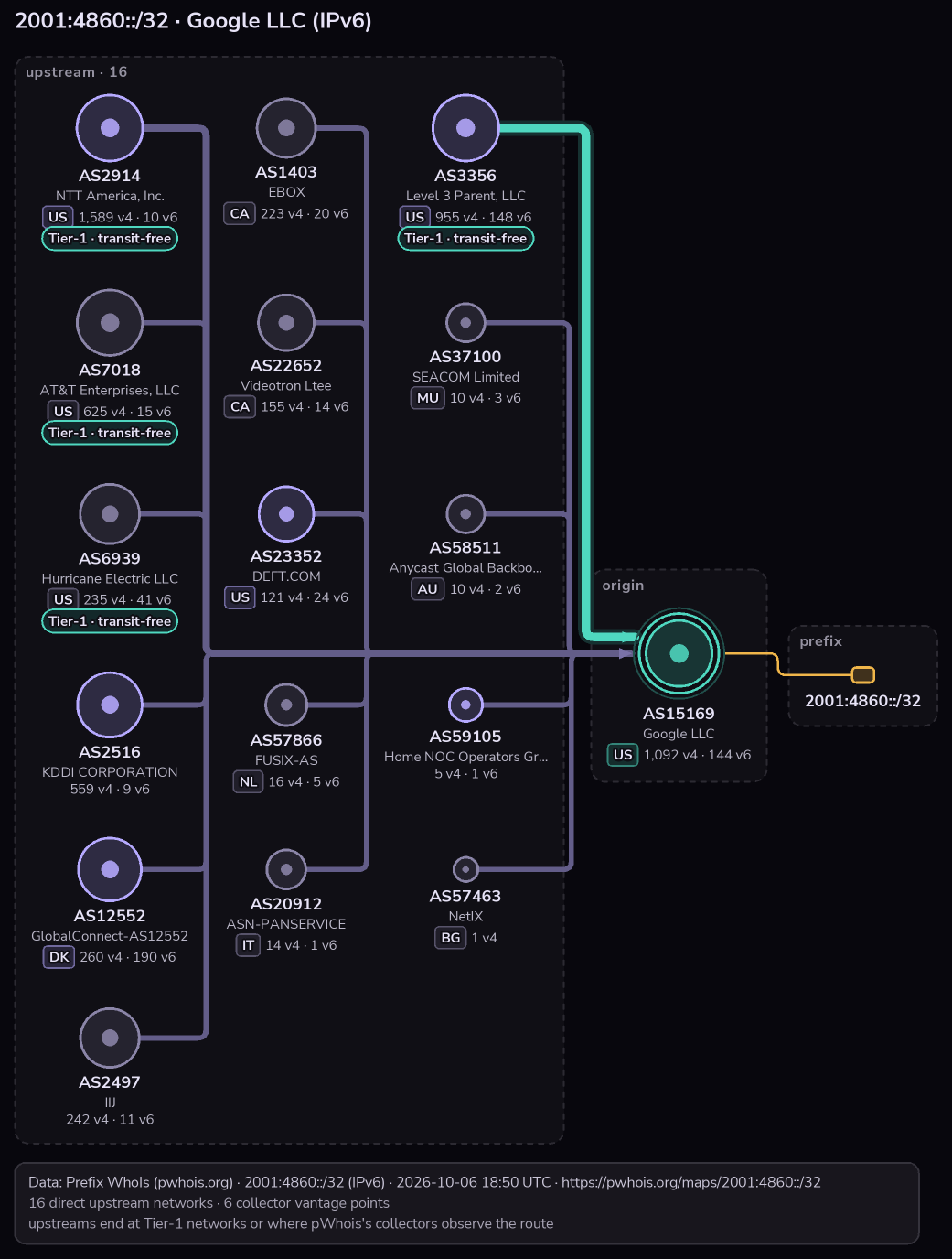
An IPv6 prefix: all 16 direct upstream networks in three sub-columns, four with a “Tier-1 · transit-free” pill (NTT, AT&T, Hurricane Electric, Level 3), the best path via Level 3 in teal, and the origin; the caption counts six collector vantage points. Real data from whois.pwhois.org, drawn by the MCP renderer on 6 October 2026 (nightwire). Open full size · SVG · Interactive map
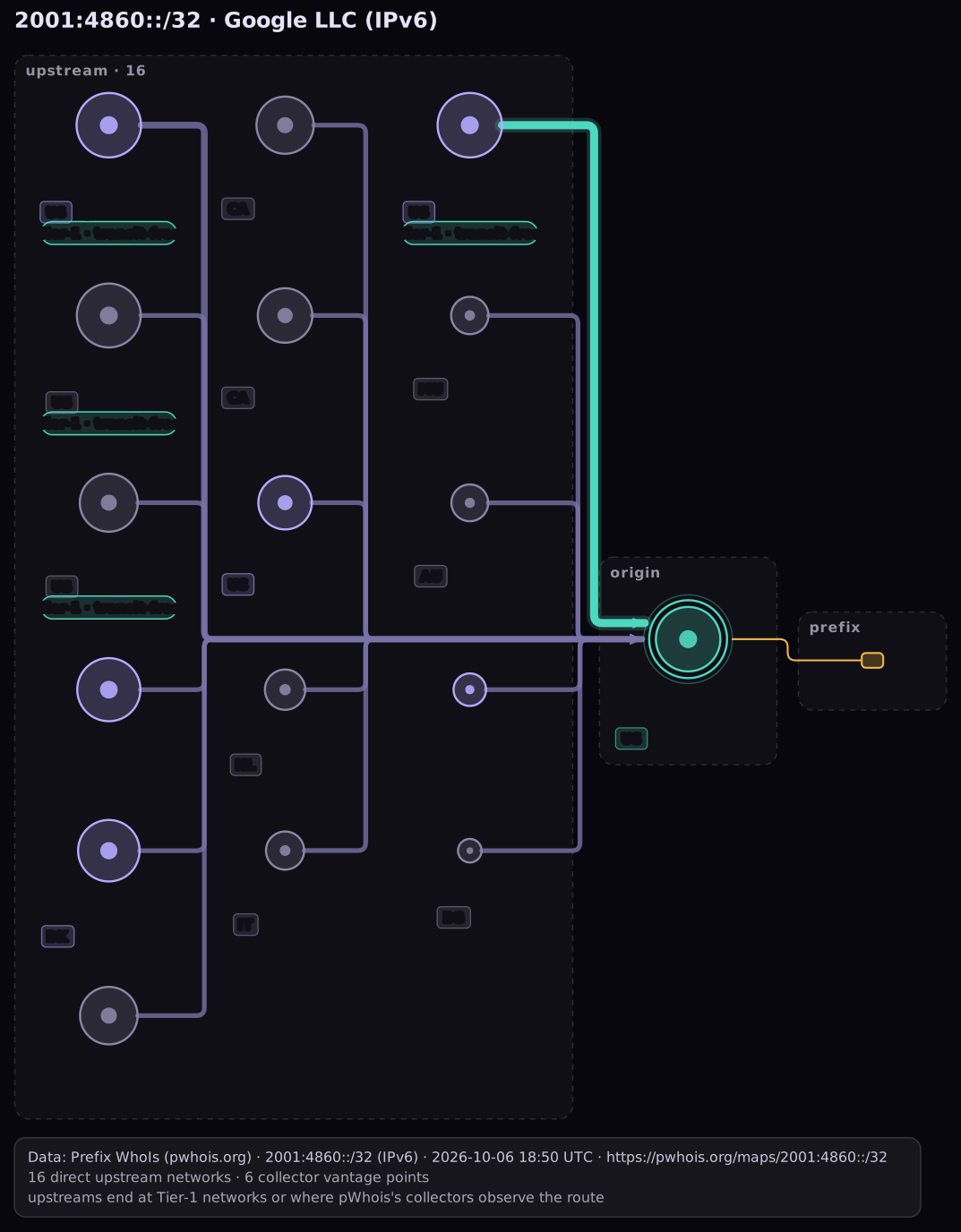
Every chart carries the attribution line “Data: Prefix WhoIs (pwhois.org)”. Please keep it when you use a chart elsewhere.
Batch, don’t loop.
Queries share the daily allowance of the network address you connect from: 5,000 per day by default, the same allowance the classic whois service gives. Addresses already granted a higher limit keep it here too. The allowance resets at 00:00 UTC.
When the allowance runs out, the tool returns a structured quota_exhausted error with the reset time. Assistants read it and stop instead of retrying, so a runaway loop cannot burn through tomorrow’s budget.
- Use
pwhois_lookup_ipsfor lists. One call of 3,000 addresses costs the same as 3,000 single lookups but finishes in one round trip. - Ask the assistant to deduplicate addresses before looking them up. Repeats cost the same as new ones.
- Call
pwhois_my_quotabefore a large job, not after. - Higher limits are customarily granted free upon reasonable request for most uses, including education, research, security teams and government. Ask on the request form.
No registration. No record of what you ask.
Nothing to sign up for and nothing to hand over. What you look up is answered and forgotten, exactly as it is for a whois query on port 43. All that is kept is the network address a connection was made from, so it can share that address’s allowance, and aggregate counts like the ones on the Stats page. Details in the privacy notice.
Need more than 5,000 a day?
Tell us who you are, what you are doing and which addresses you connect from. Education, research, security and government use is customarily granted a higher allowance, free, upon reasonable request.
Request a higher limitWhat assistants are asking.
The last 30 days of connector traffic statistics.
Tool calls, last 30 days
Which tools get used
Where the assistants connect from
pwhois_lookup_ips batches rather than one at a timeCharts drawn
pwhois_map) · 1 on the web mapspwhois_map) · 118 on the web mapsAn assistant chart is one pwhois_map call that returned a picture. A web map is one build, expansion or downstream fetch on pwhois.org/maps.
The networks people map most
Share of AS maps built on the web in the last 7 days. AS numbers only, never an address, and a network is listed once at least 2 different addresses have mapped it. Assistant charts keep no record of what was drawn.
Not enough maps yet this week to list any network.
What the assistant already knows.
enrich_logPaste any text with addresses in it. The assistant extracts them, looks them up in one batch and returns a tally by origin AS and country, plus the addresses with no route in the table, honestly labeled.profile_asGive an AS number. The assistant gathers who it is, what it originates in each family and what transits it, then writes a short profile you can drop into a ticket.pwhois://docs/maps). The assistant can read them without spending a query.quota_exhausted carries the reset time; invalid input says what was wrong. Nothing to parse from prose.whob or whois -h whois.pwhois.org.Quick answers.
Does it cost anything?
No. The connector is free, like the whois service it sits on. Higher limits are also free for most uses.
Do I need an account or an API key?
No. Add the connector, press Connect on the page that opens, and start asking.
How is the daily allowance counted?
By the network address you connect from. Assistant calls and classic whois queries from that address draw from the same 5,000. pwhois_my_quota shows the balance any time.
What happens when I run out?
Tools return a quota_exhausted error with the reset time. The assistant stops and tells you. The allowance returns at 00:00 UTC.
Which clients work?
Claude.ai custom connectors, Claude Desktop, Claude Code, Cursor and any MCP client that supports Streamable HTTP with OAuth.
How current is the data?
The routing table is rebuilt daily from around 90 peers. pwhois_routing_status reports when the current cache was built, at no cost.
Can I look up a whole log at once?
Yes. pwhois_lookup_ips takes up to 5,000 addresses in one call (500 when you want every individual record) and clusters them by origin AS and country; for bigger logs the assistant simply sends the next chunk. The enrich_log prompt does the extraction for you.
Is it private?
Yes. There is no registration, and what you ask about is not kept, the same as a whois query on port 43. The network address you connect from is remembered so your queries share its allowance, and usage is published only as aggregate percentages.
Can the assistant draw a chart of a network?
Yes. Ask it to “draw a network diagram of AS15169” or “show me the BGP path to 2001:4860::/32” and pwhois_map answers with a picture (PNG by default, SVG on request), a link to the interactive map and a link that reproduces the exact look. Each chart costs 5 queries from the same daily allowance. See Network diagrams.
Is this the same data as whois.pwhois.org?
Yes. Same table, same records, same allowance. The connector is a new door into a service that has been open since 2005.