
Make it yours.
Every map you build on pWhois Maps leaves as a file you own: vector SVG, PNG, Mermaid, Graphviz DOT, the raw graph JSON, or an edge list in CSV. Restyle it in the browser, keep editing it in your own toolchain, and drop it into docs, wikis, tickets or slides. Nothing here phones home: the renderers below run on this page.
Formats at a glance
Open a map, press Export & embed (or E). The Native tab saves what you see; the Mermaid and Graphviz tabs give you editable source generated from the same graph and style, with a live preview. The Design canvas (from the Style panel) is the same thing in a side panel, so you can iterate with the map in view.
Vector, styles inlined, caption with attribution and permalink. Opens in browsers, Inkscape, Illustrator, Figma.
sample.svg ↓Raster at 1–4×, optional transparent background. For slides, chat and tickets.
Text you can paste into GitHub, GitLab, Notion-style editors, Docusaurus or any page that loads Mermaid.
sample.mmd ↓DOT for dot, neato, fdp, sfdp, circo, twopi. Scriptable, diffable, printable.
The full graph document (pwmaps/1), every enrichment field. The source of truth for your own renderer.
One row per edge: source_asn,target_asn,target_prefix,target_ip,kind,families,weight,best. One type per column: bare ASNs, CIDR prefixes and addresses, empty where a column does not apply (path and customer, i.e. downstream, edges fill target_asn, originates fills target_prefix, contains fills target_ip; bundle counts are left out). families is v4, v6 or v4+v6: the families an adjacency was seen on, or the family of the prefix or address (empty when unknown). Spreadsheets, pandas, Gephi.
Mermaid quickstart
Mermaid turns text into diagrams in the browser. pWhois Maps writes a flowchart
with an %%{init}%% block carrying your colors and font, one node per AS / prefix / bundle, and a
classDef per node role so you can restyle everything in one place.
1. Self-host Mermaid
Install it from npm (npm install mermaid) and copy node_modules/mermaid/dist/mermaid.min.js next to your page,
or vendor the file into your static assets. No CDN is needed.
<script src="/js/mermaid.min.js"></script>
<script>
  mermaid.initialize({ startOnLoad: true, securityLevel: 'strict' });
</script>

<pre class="mermaid">
flowchart LR
  AS8220["AS8220<br/>COLT"] --> AS15169["AS15169<br/>Google LLC"]
</pre>
securityLevel: 'strict' is Mermaid's default and what we use: labels are sanitized and click handlers are disabled.
2. Restyle with the pw* classes
Every node carries one of nine classes (pwCustomer, for downstream networks, and pwGhost, for a “+K more upstreams” node, appear only when the map shows some). Override them at the end of the source (the last classDef wins):
classDef pwOrigin   fill:#4fd8c0,stroke:#e7e3f7,color:#12101d,stroke-width:2.5px
classDef pwUpstream fill:#b6aaff,stroke:#d2caff,color:#12101d
classDef pwPeer     fill:#8b85a8,stroke:#b7b3c9,color:#12101d
classDef pwAs       fill:#9487d8,stroke:#bdb5e7,color:#12101d
classDef pwPrefix   fill:#f0b64a,stroke:#f6d28f,color:#12101d
classDef pwBundle   fill:#6b58d6,stroke:#a397e6,color:#f4f2ff,stroke-dasharray:4 3
classDef pwIp       fill:#ff8f7a,stroke:#ffbaad,color:#12101d
classDef pwCustomer fill:#6fdc8c,stroke:#a6e9b8,color:#12101d
Node ids are stable and readable: AS15169 for autonomous systems, P1… for prefixes,
B1… for prefix bundles, IP1… for an address you looked up. Best-path edges get a
linkStyle line; turn on Edge labels to write AS8220 -- 972 --> AS15169; an adjacency seen only on the other family than the view leads with its tag, AS174 -- v6 · 8 paths --> AS36324
(the number is how many routes cross that adjacency). Change flowchart LR to TB for a vertical map.
Each origin's prefixes sit in their own subgraph SG_AS15169, laid out as a small grid by invisible
~~~ links and reached by one arrow, so the diagram stays compact and landscape. At most 12 prefixes are drawn
per origin; the rest are counted in its B1 “+N prefixes” node (the JSON and CSV exports keep every one).
3. Live example
This is sample.mmd, exported from the AS15169 map, rendered right here by the same Mermaid build Maps uses.
Edit the source and press Render (or Ctrl/⌘+Enter).
Renders when you scroll here (Mermaid, about 3.6 MB, loads once).
Graphviz quickstart
Graphviz is the classic: a text format (DOT) and a family of layout engines. Install it
(brew install graphviz, apt install graphviz, or the Windows installer from graphviz.org) and:
dot -Tsvg map.gv -o map.svg            # layered, follows rankdir
dot -Tpng -Gdpi=200 map.gv -o map.png  # print-quality raster
dot -Kneato -Tsvg map.gv -o map.svg    # spring layout; also fdp, sfdp, circo, twopi
dot -Tpdf map.gv -o map.pdf
What the export writes
| Where | Attribute | Meaning |
|---|---|---|
| graph | rankdir=LR|TB | Direction from the Style panel (providers flow toward the origin). |
| graph | bgcolor, fontcolor | Background and text color from your style. |
| graph, node, edge | fontname | Helvetica for Nunito Sans, the default (Courier for JetBrains Mono): fonts every Graphviz build can measure, so each box is sized to its text. If you have JetBrains Mono installed, swap it in; the comment at the top of the file says how. |
| graph | label, labelloc=b | The caption: attribution, data timestamp and permalink. |
| graph | nodesep, ranksep, newrank, compound | A compact layout: 0.25″ between nodes, 0.6″ between ranks, global ranks across clusters. |
| graph | layout, overlap, sep | Only when you pick an engine other than dot in the Graphviz tab (overlap=false, sep="+8"). |
| subgraph | cluster_AS15169 | The origin's prefixes in one panel (at most 12, the rest counted in its “+N prefixes” node). With dot they form a grid, chained by style=invis edges, reached by one lhead arrow. |
| node | label | The same detail lines as the map (ASN, org, CC and prefix counts by default), wrapped at about 22 characters and joined with \n. Shapes grow to fit (no fixedsize). |
| node | fillcolor, color, fontcolor | Role color, a matching outline, and a text color with at least 4.5:1 contrast against the fill, in every preset. |
| node | class | pwOrigin … pwIp: lands on the SVG <g>, so CSS can restyle the output. |
| node | URL, tooltip | Links back to the node's own map, e.g. https://pwhois.org/maps/8220/4 (see Permalinks). |
| edge | penwidth | 1–4, log-scaled by the number of routes over that adjacency (or uniform). |
| edge | color, xlabel | Best path in your best-path color; route counts as labels when Edge labels is on (xlabel="v6 · 8" for an adjacency seen only on the other family than the view). |
Engines in one line each: dot hierarchical (the default, best for AS paths), neato and fdp spring models,
sfdp for big graphs, circo circular, twopi radial around the origin.
Live example
sample.gv laid out by Graphviz compiled to WebAssembly, on this page. Switch the engine to compare layouts.
Renders when you scroll here (Graphviz WebAssembly, about 1.3 MB, loads once).
SVG & PNG notes
- Styles are inlined. The SVG carries its colors on each element, plus
<title>and<desc>for screen readers, and opens the same anywhere. - Fonts are not embedded. Maps draw in Nunito Sans by default (the site's text face), or in JetBrains Mono if you pick it under Style → Font.
Text uses
font-familystacks such as'Nunito Sans', system-ui, -apple-system, 'Segoe UI', Roboto, sans-serif('JetBrains Mono', ui-monospace, …, monospacefor the alternative), so a viewer without the font falls back cleanly. If you need pixel-identical text, self-host the fonts on your page: Nunito Sans and JetBrains Mono are both under the SIL Open Font License 1.1, which allows bundling with your site. - PNG is rasterized in your browser from the same SVG at 1–4×; because SVG-as-image cannot load web fonts, PNG text uses your system's sans-serif (or monospace, for JetBrains Mono) unless the font is installed.
- Caption. A caption block sits under the drawing, inside the image, on its own rounded panel: the attribution, then the map subject, data timestamp, export time and permalink, wrapped to the image width. Untick it only if you credit the data elsewhere (see Attribution).
- Legible labels. Labels on the native map get a thin halo in the background color, so they stay readable where they cross edges; the drawing is padded on every side so nothing touches the edge or gets clipped in PNG.
- Transparent background drops the background rectangle, for placing maps on colored slides.
@font-face {
  font-family: "Nunito Sans";
  src: url("/fonts/NunitoSans-var.woff2") format("woff2");
  font-weight: 200 1000; font-display: swap;
}
@font-face {
  font-family: "JetBrains Mono";
  src: url("/fonts/JetBrainsMono-var.woff2") format("woff2");
  font-weight: 100 800; font-display: swap;
}
Graph JSON schema (pwmaps/1)
The JSON export is the exact document the map was drawn from. Field order is not guaranteed; parse by key, and expect new optional fields.
| Field | Type | Meaning |
|---|---|---|
| document | ||
| ok | bool | true for a built map. Errors are {ok:false, error, reason}. |
| schema | string | Always "pwmaps/1" for this layout. |
| q | object | The query: raw as typed, kind (ip | prefix | asn), norm (normalized), family (4 | 6). |
| center | string | Id of the node the map is centered on, e.g. "as:15169". |
| built | int | Unix time the graph was built. |
| cached | bool | Served from the 24-hour cache. |
| sampled | bool | The server answer was capped, so the map is a sample. |
| empty | bool | No route for the query; note explains (and may name a covering prefix). |
| nodes[], edges[] | array | See below. |
| stats | object | nodes, edges, prefixes_total, prefixes_shown, upstreams[{asn, weight}], and on an AS map upstreams_total, upstreams_drawn, hidden_upstreams, collector_peers_total, upstreams_direct, farther_hops_total, tier1_count, farther_hops_trimmed. |
| meta | object | queries[] asked on port 43, ms, cache_date{v4,v6}, peers{v4,v6}, attribution, quota{limit,used,remaining,resets_at}, notes[]. |
| every node | ||
| id | string | Stable id: as:15169, pfx:8.8.8.0/24, ip:8.8.8.8, bundle:15169:4. Merges dedupe on it. |
| kind | string | as | prefix | ip | bundle. |
| kind = as | ||
| asn | int | Autonomous system number. |
| label | string | Org name, or AS n when unknown. |
| org | string | Registered organization. |
| cc | string | Registry country code. |
| prefixes4, prefixes6 | int | Prefixes this AS originates in the IPv4 / IPv6 table. |
| seen4, seen6 | bool | The AS appears in this map's IPv4 / IPv6 peer paths (an AS seen on one family only stays on the map in both views). |
| rank4, rank6 | int | Rank by prefixes originated (1 = most); 0 when unranked. |
| role | string | origin (the center), upstream (provides transit toward it), peer (a collector peer: the first AS of observed paths, whose sessions feed pWhois's collectors, joined by a peer edge to the AS it hands off to — not a provider of the center; or an upstream that also shows up downstream), customer (a downstream network: reached through the center, see Downstream). |
| source | string | Registry of record (ARIN, RIPE, APNIC, LACNIC, AFRINIC), when known. |
| degree | int | Adjacencies of the center (center only). |
| weight | int | Routes that cross this AS on the way to the origin. |
| hidden_neighbors, hidden_edges | int | On the center: how many neighbours / edges were pruned to keep the map readable. |
| tier1 | bool or string | On VOSTROM's Tier-1 list (the string is its label). Drawn with a “Tier-1 · transit-free” badge; nothing is drawn above it. |
| transit_free | bool or null | Upstreams not on the list: true when pWhois paths show nothing above it (a “transit-free” badge, nothing drawn above), false when they do, null when unknown. |
| fanout_total | int | On a direct upstream: how many farther-hop networks lie beyond it on paths to the center. |
| parent, hop, rank | int | Farther hops: the upstream they are reached through, their distance from the center (2, 3 …) and their place in that upstream's fan-out (best path first, then paths carried). The map draws 8 per upstream at hop 2 and 4 at hop 3; the rest are one “+K more upstreams” node (bundle:up:<asn>, of: "upstreams", class pwGhost) whose drawer lists them. |
| boundary | bool | The last drawn network of a chain where pWhois's collectors receive the route: a small “observed from here” tick. |
| level, via | int | Downstream networks: hops from the center (1 = direct), and the AS they were reached through. |
| cone4, cone6 | int | Downstream networks: prefixes behind them (their own and everything further down). prefixes4/6 are then the prefixes they announce themselves in these routes. |
| downstream_asns, sample | int, array | Downstream networks: networks behind them, and up to 12 sampled prefixes {prefix, origin_asn, originated_ts, family, path} (path from the center). |
| down_summary | object | On an AS whose downstream was loaded: direct, downstream_asns, prefixes4/6, countries, sampled, mode, also (upstreams / peers also seen downstream), drawn, more. |
| kind = prefix | ||
| prefix | string | CIDR, e.g. 8.8.8.0/24. |
| family | int | 4 or 6. |
| origin_asn | int | AS announcing it. |
| originated, originated_ts | string, int | When this origin first announced it (ISO 8601 and Unix time). |
| status | string | best or alt. |
| paths | int | Peer paths seen for it. |
| best_path | int[] | AS path of the best route, collector side first. |
| net_name, org | string | Network name and organization from the address registry. |
| geo | object | city, region, country, cc, lat, lon. |
| cache_date | string | When the answering server refreshed its table. |
| kind = ip | ||
| ip | string | The address you asked about. |
| prefix | string | Most-specific covering prefix. |
| kind = bundle | ||
| asn, family | int | Whose prefixes, which table. |
| count | int | Prefixes not drawn individually. |
| sample | array | Up to 300 of them: {prefix, originated_ts, best_path}. |
| of | string | "customers" on bundle:customers:<asn>: the “+N more downstream” networks not drawn (count). |
| every edge | ||
| id | string | source>target. |
| source, target | string | Node ids. path edges point upstream → downstream, i.e. toward the origin; customer edges point from the center (or a fanned-out network) to a network reached through it. |
| kind | string | path (AS adjacency), peer (a collector peer hands off to an upstream or the center; drawn dashed and muted, dotted in Mermaid / DOT), customer (downstream), originates (AS → prefix or bundle), contains (prefix → ip). |
| weight | int | Routes over the adjacency (path), prefixes reached through it (customer), or prefixes in a bundle. |
| document, when downstream is shown | ||
| downstream | object | asn, mode (bounded | full), drawn (direct | full), sampled, also and the server's summary (direct, downstream_asns, prefixes4/6, countries, routes read). |
| best | bool | Part of a best path. |
| families | string[] | path edges: ["v4"], ["v6"] or ["v4","v6"], the families the adjacency was seen on in any peer path (best or not). The map tags an edge seen only on the other family than the view (a “v6” pill in the IPv4 view, “v4” in the IPv6 view). |
| peers, prefixes | int | path edges: distinct route-server peers that saw the adjacency, and distinct prefixes behind it. |
{ "ok": true, "schema": "pwmaps/1",
  "q": { "raw": "AS15169", "kind": "asn", "norm": "15169", "family": 4 },
  "center": "as:15169",
  "nodes": [ { "id": "as:15169", "kind": "as", "asn": 15169, "org": "Google LLC", "role": "origin" },
             { "id": "as:8220",  "kind": "as", "asn": 8220,  "role": "upstream", "weight": 972 } ],
  "edges": [ { "id": "as:8220>as:15169", "source": "as:8220", "target": "as:15169",
               "kind": "path", "weight": 972, "best": true } ] }
Style JSON
The Style panel on Maps is a small JSON object. Export it to keep it, Import it on another machine or share it with your team;
the same object drives the native map and the generated Mermaid and DOT. It is saved in your browser (localStorage key pwmaps.style) and never sent to us.
Presets: Nightwire (default), Phosphor (teal), Ember (amber), Paper (light, for documents), Mono (grayscale).
{
  "preset": "nightwire",
  "bg": "#08070d",
  "node": { "as": "#9487d8", "origin": "#4fd8c0", "upstream": "#b6aaff", "peer": "#8b85a8",
            "prefix": "#f0b64a", "ip": "#ff8f7a", "bundle": "#6b58d6", "customer": "#6fdc8c" },
  "edge": { "path": "#7a72a8", "best": "#4fd8c0", "originates": "#f0b64a", "contains": "#ff8f7a", "customer": "#4fae72" },
  "text": "#e7e3f7",
  "font": "Nunito Sans",
  "colorBy": "role",
  "sizeBy": "prefixes",
  "labels": "both",
  "edgeWidth": "weight",
  "showPrefixes": true,
  "showBundles": true,
  "direction": "LR",
  "caption": true,
  "edgeLabels": false,
  "detail": {
    "as":     { "asn": true, "org": true, "cc": true, "prefixes": true, "rank": false, "source": false, "downstream": true },
    "prefix": { "org": true, "netName": false, "originated": false, "geo": false, "paths": false, "originAsn": false },
    "ip":     { "org": true, "geo": true },
    "hover": "full"
  }
} | Key | Values | Effect |
|---|---|---|
| bg, text, node.*, edge.* | #rrggbb | Colors per node role and edge kind (customer = downstream networks and their edges). Invalid values fall back to the preset. |
| font | Nunito Sans | JetBrains Mono | Label font; Nunito Sans is the default (fallback stacks are added for you). Any other name falls back to Nunito Sans. |
| colorBy | role | cc | registry | rank | What AS node color encodes. |
| sizeBy | prefixes | degree | uniform | What AS node size encodes on the native map. |
| labels | both | asn | org | none | both uses the detail selection; the others are compact single-line modes. |
| edgeWidth | weight | uniform | Edge thickness by routes carried, or all the same. |
| showPrefixes, showBundles | bool | Include prefix satellites and the "+N prefixes" bundles. |
| direction | LR | TB | Layered layout, Mermaid and DOT direction (the Flow view always runs left to right, top to bottom on a phone). |
| caption, edgeLabels | bool | Attribution caption on exports; route counts on edges. |
| detail.as | bools | Lines under AS nodes: AS15169 / org / US · 1,092 v4 · 144 v6, plus rank and registry when on; downstream adds 1,336 downstream · 1,424 networks on an AS whose downstream is loaded. |
| detail.prefix | bools | Lines under prefixes: org, net name, originated date, city + CC, path count, origin ASN. |
| detail.ip | bools | Lines under an address: org, city + CC. |
| detail.hover | full | brief | Hover card shows every enrichment field, or just the canvas lines. |
Your saved style
What this browser has saved from the Style panel, ready to copy:
Embed recipes
Plain image
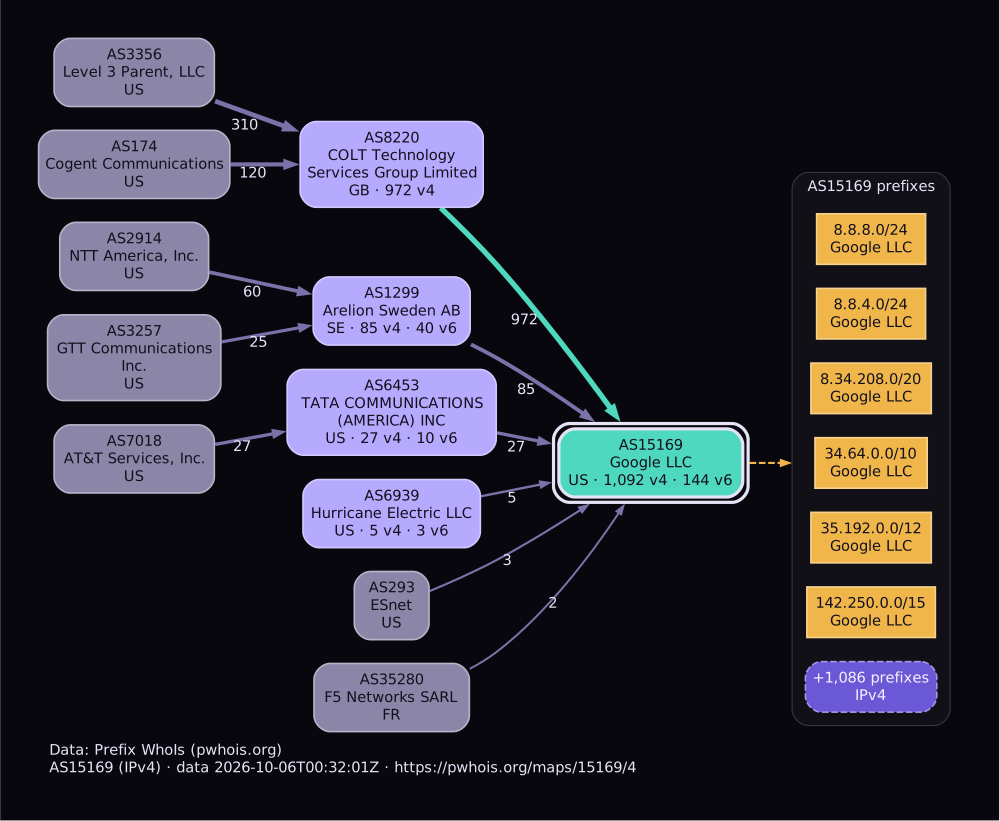
<img src="/img/as15169.svg" alt="BGP adjacency map of AS15169 (Google LLC), pWhois Maps" width="960">
Simplest and safest. This one is sample.svg, embedded exactly that way:
Inline SVG
Paste the file's <svg> element into your HTML to style it with your page CSS (each node group carries its class, e.g. pwOrigin).
If you inline several maps on one page, keep their ids unique.
<figure class="bgp-map">
  <svg viewBox="0 0 960 540" role="img" aria-labelledby="t1"> <title id="t1">AS15169</title> … </svg>
  <figcaption>Data: Prefix WhoIs (pwhois.org)</figcaption>
</figure>
<style> .bgp-map .pwOrigin polygon, .bgp-map .pwOrigin path { stroke-width: 3; } </style>
GitHub / GitLab markdown
Both render Mermaid fences natively. In the Mermaid tab press Copy markdown fence, then paste:
```mermaid
%%{init: {"theme":"base","themeVariables":{"background":"#08070d"}}}%%
flowchart LR
  AS8220["AS8220<br/>COLT"] --> AS15169["AS15169<br/>Google LLC"]
  classDef pwOrigin fill:#4fd8c0,stroke:#e7e3f7,color:#12101d
  class AS15169 pwOrigin
```
Hugo
Add a code-block render hook so ```mermaid fences become diagrams, and load your self-hosted Mermaid only on pages that use it:
{{/* layouts/_default/_markup/render-codeblock-mermaid.html */}}
<pre class="mermaid">{{ .Inner | htmlEscape | safeHTML }}</pre>
{{ .Page.Store.Set "hasMermaid" true }}

{{/* layouts/_default/baseof.html, before </body> */}}
{{ if .Store.Get "hasMermaid" }}
  <script src="/js/mermaid.min.js"></script>
  <script>mermaid.initialize({ startOnLoad: true, securityLevel: "strict" });</script>
{{ end }}
For Graphviz in Hugo, render the .gv to SVG at build time (dot -Tsvg) and include it as an image or inline partial.
Docusaurus
// docusaurus.config.js   (npm install @docusaurus/theme-mermaid)
export default {
  markdown: { mermaid: true },
  themes: ['@docusaurus/theme-mermaid'],
};
Then any ```mermaid fence in your docs renders. The %%{init}%% line keeps your pWhois colors.
Downstream & the Flow view
An AS map also shows the networks behind the AS: the ones reached through it in the AS paths Prefix WhoIs observes. For every route whose path crosses the AS, the part of the path after it, toward the origin, is its downstream: the next AS is a direct downstream network, later hops are deeper, and the origin brings the prefix. Rows the AS originates itself are already on the map and are left out, as are routes a collector hears from the AS directly (its whole table, not only what is behind it).
- What it means. “Downstream” is what the routing data shows, not a contract. Most of these are networks that reach the Internet through it, but a large peer can appear when a feed buys transit from the AS. An AS that is already on the map as an upstream or peer of the center is drawn as a peer, not as downstream, and counted as “also upstream / peer”.
- Costs. It is off when a map opens. Turning it on costs one more chart input (the map and its downstream: two). The Downstream menu in the toolbar switches it: Off (free, the default), Direct downstream or Full cone (one more input); the center's card also has Load downstream. Fanning out a downstream network costs one; the searchable list of every direct downstream network in the drawer is free.
- Sampled. The automatic view reads at most 20,000 downstream routes, 12 MB or 12 s per address family. When a cap cuts the answer, a sampled badge appears: the counts and the list cover what was read, and Load full cone reads up to 250,000 routes (64 MB, 60 s). Both views are cached for 24 hours, so reopening a map costs inputs but no server time.
- On the map. The largest direct downstream networks are drawn (green, with arrows from the center): 24 on a wide screen (fewer when the map already shows many upstreams and peers, never under 8), 12 on a smaller one, 8 on a phone. The rest are one “+N more downstream” node, and the drawer pages through all of them (100 at a time, searchable by ASN, name or country). Each shows what is behind it (“US · 410 pfx behind · 37 networks”); while no more than 12 are drawn on a wide screen, each also shows its own prefixes beneath it, otherwise they are listed in the drawer (“Prefixes behind it”). The full cone also draws a deeper level (up to 12 networks). Double-click a downstream network, or use Fan out, to draw the networks behind it one column further right.
The Flow view
Flow is the default layout for an AS map on a wide screen (Force, Layered and Radial stay one click away; Layered loads Graphviz
when you pick it). The layout you pick sticks for your next maps. Flow reads left to right in
columns, each on a faint labelled band: upstreams by hop distance, the center (with any upstream that also shows up downstream, drawn
above or below it on a dashed link and tagged “also downstream”), its direct downstream networks, then deeper levels. Rows are
ordered by weight and nudged toward their neighbours; a column wraps only when it would not fit the screen's height, and the arrows then
run along the gaps between the columns, never through another network. On a phone the same columns run top to bottom.
The Layered layout keeps the same sides through Graphviz rank=same groups.
Exports keep the ranks and stay landscape: they draw at most 12 direct downstream networks (the rest join “+N more
downstream”) and 6 per deeper level, and a column of more than 6 wraps into sub-columns side by side. Mermaid puts each column in
its own subgraph, left to right (a wrapped one holds a nested subgraph per sub-column, joined by invisible ~~~ links):
flowchart LR
  subgraph RK_U1 ["upstream"]
    direction LR
    AS3356["AS3356<br/>Level 3 Parent, LLC"]
  end
  subgraph RK_F ["focus"]
    direction LR
    AS7018["AS7018<br/>AT&T Enterprises, LLC"]
  end
  subgraph RK_D1 ["downstream"]
    direction LR
    AS20057["AS20057<br/>AT&T Enterprises, LLC"]
  end
  AS3356 --> AS7018
  AS7018 --> AS20057
  classDef pwCustomer fill:#6fdc8c,stroke:#a6e9b8,color:#12101d
  class AS20057 pwCustomer
DOT (with the dot engine) adds one { rank=same; … } group per column (per sub-column, chained by
invisible edges, when it wraps), so Graphviz keeps upstreams,
the center and each downstream level in their own rank; downstream edges carry class="pwCustomer" and the downstream colour.
JSON adds the downstream summary and the downstream nodes and edges (see the schema); CSV writes
customer rows with the downstream ASN in target_asn.
Downstream is off when a map opens: turn it on from the toolbar's Downstream menu, or from Load downstream on the
center's card. A permalink with the /downstreams verb opens with it on, e.g. https://pwhois.org/maps/7018/4/downstreams
(see Permalinks); the full cone is loaded from the menu. A shared look stores the downstream view, full cone
included, and up to six fanned-out networks.
Permalinks & sharing
Every map has a short, readable address. The address bar shows it as you explore, and the Share button copies it:
| Address | Map |
|---|---|
/maps/36324, /maps/36324/4, /maps/36324/6 | An origin AS and its neighbours; the last part picks the IPv4 or IPv6 prefixes (IPv4 when left out). |
/maps/8.8.8.8 | Who carries an IPv4 address: its covering prefix, origin AS and the paths that reach it. |
/maps/8.8.8.0/24 | The same for a prefix. |
/maps/2001:4860::8888, /maps/2001:4860::/32 | IPv6 address or prefix, colons and all. If a tool mangles colons in links, write them as dashes: /maps/2001-4860--/32. |
/maps/k3v9q2xa7 | A shared look (nine letters and digits; see below). |
/maps/me (or /maps/relative) | Where you are: Maps looks up the network you are browsing from (free) and builds its prefix map (one chart input); the address bar then shows that prefix's own address. From a private or unrouted address (an office LAN, carrier-grade NAT) there is nothing to map, so the landing page says why instead. |
An AS map's address can end in one or both view verbs, in either order. The address bar follows the toolbar as you switch them:
| Verb | Effect |
|---|---|
/downstreams | Opens with the downstream networks drawn (one more chart input). Without it, Downstream is off.
/maps/36324/downstreams is the IPv4 map. |
/collectors | Draws the collector vantage points: the networks whose sessions feed pWhois's collectors (the first AS of observed paths). They are where routes are seen from, not providers of the center, so they are hidden by default; the center's card always says how many there are. Free: it changes the drawing, not the data. |
For example https://pwhois.org/maps/36324/4/downstreams/collectors. Any other trailing part is not a map address and answers
“not found”. Older links of the form /maps/?q=AS15169&f=4, ?down=…, ?collectors=1
and /map/… keep working and switch to the short form.
A permalink opens a fresh map in the default look, or in the viewer's own saved style, and uses their chart inputs (one, or two with
/downstreams). DOT node links and the caption's permalink carry the same verbs as the exported map.
Share this exact look
Under Share → Share this exact look, Maps stores what you see under a short id, https://pwhois.org/maps/<id>:
the query and address family, the layout (Flow, Force, Layered or Radial), your style (colours, font, labels and Detail fields), up to six expansions,
the downstream view with up to six fanned-out networks, whether collector vantage points are drawn, and where the nodes sit. It stores no routing data and nothing about you beyond the source address (for abuse control, as on
Credits & limits). Whoever opens the link rebuilds the map with their own chart inputs
(one, plus one per expansion, plus one for the downstream view and one per fanned-out network); the look is applied for that view only, and they can choose Keep this style to make it theirs.
- Retention: a shared look is kept until a year has passed since it was made and since its last visit, then removed; a removed link says so.
- Limit: 30 shared looks per source IP per UTC day. Plain permalinks are unlimited.
Attribution requirement
When you publish a map, keep this line with it:
Data: Prefix WhoIs (pwhois.org)
SVG and PNG exports carry it in a caption under the drawing by default, with the data timestamp and the permalink;
Mermaid exports carry it as a %% comment, DOT as the graph label, and the JSON in meta.attribution.
If you untick the caption, put the line in your figure caption or credits instead. More on sources, licenses and terms:
Credits & limits.
Limits
- 100 chart inputs per source IP per UTC day. Building a map, expanding a node, loading a downstream view (automatic on AS maps) or fanning out a downstream network costs one each; restyling, exporting, previewing and re-downloading cost nothing. The counter on Maps shows what is left and resets at 00:00 UTC.
- A humanity check (an invisible Vouch token) protects map building. If it decides to challenge you, a small widget appears once.
- No public API. The map endpoints are for the page. For automation, ask the server directly on port 43 — it is free and documented — or run your own pwhoisd fed from your routers:
whois -h whois.pwhois.org "type=json routeview source-as=15169"
whois -h whois.pwhois.org "type=all routeview prefix=8.8.8.0/24"
Need more for an operational use case? Ask for a higher limit.
FAQ
Why does my PNG use a different font than the screen?
Browsers will not load web fonts into an SVG that is drawn as an image, so the rasterizer uses the fallback in the font stack. Install Nunito Sans (or JetBrains Mono, if you chose it) locally, or export SVG and convert it with a tool that has the font (Inkscape, rsvg-convert).
Can I edit the Mermaid or DOT and load it back into Maps?
No; Maps draws from the graph JSON. Edit the source freely in the canvas and in your own tools. To change what Maps draws, use the Style panel, and export the style JSON to reuse it.
Which way do the arrows point?
From upstream to downstream, toward the origin AS: the direction routes are announced back from the origin, reversed. AS8220 --> AS15169 means AS8220 carries routes to AS15169.
Why are some neighbours missing?
Large networks have hundreds of adjacencies. Maps keeps the strongest 48 direct neighbours and any edge above 0.5 % of routes, then records what it hid (hidden_neighbors, hidden_edges on the center node). Expand a node to see its own neighbourhood.
Is anything sent to a third party when I preview or export?
No. Mermaid and Graphviz are served from pwhois.org and run in your browser; downloads are generated locally. The only external script on Maps pages is the Vouch humanity check from vostrom.com.
Is the Mermaid preview safe with odd org names?
Yes. Labels are escaped when the source is generated, and Mermaid runs with securityLevel: 'strict', which sanitizes labels and disables click handlers.
How fresh is the data in an export?
The caption and meta.cache_date say when the server last refreshed its table; built says when the graph was assembled. Maps are cached for 24 hours.
Where do the upstreams stop?
At Tier-1 networks (VOSTROM's list) and networks observed transit-free in pWhois paths, which carry a badge, and where pWhois's collectors receive the route, marked “observed from here”. Each direct upstream shows up to 8 farther networks at hop 2 and 4 at hop 3; a dashed “+K more upstreams” node lists the rest. Mermaid and DOT include the drawn ones and that node (pwGhost); CSV lists every farther-hop edge.
Can I use the exports in commercial material?
Personal and operational use is what the service is for, with attribution kept. Registry-derived organization names may not be used for advertising or marketing; bulk harvesting is not allowed. See Credits & limits for the terms.