
Same trace. Terminal, SVG, Mermaid, JSON, map.
Text for the terminal, diagrams for the page, JSON for the pipeline, GeoJSON and KML for the map. The trace does not change; the rendering does.
[host]$ lft -S -E eggs.gnu.org:587

TTL LFT trace to eggs.gnu.org (209.51.188.92):587/tcp
 1  192.0.2.1 0/1/1 ±0ms
**  [neglected] no reply packets received from TTLs 2 through 4
 5  nyiix-px.jfk01.twdx.net (198.32.160.208) 2/2/2 ±0ms
 6  bbr02-ae-4-901.bos01.twdx.net (198.160.63.126) 7/7/7 ±0ms
 7  dcr03-hu-0-8-0-0.bsn04.twdx.net (198.160.62.201) 7/7/7 ±0ms
**  [firewall] the next gateway may statefully inspect packets
 8  mass-ix.fsf.org (206.53.143.61) 7/7/7 ±0ms
 9  [target open] eggs.gnu.org (209.51.188.92):587 7.4ms
The default report. Annotations inline with -A/-N; multi-sample hops print min/avg/max ±stddev; the last line is the verdict.
flowchart TB
  n0(["192.0.2.1:50535"]):::source
  n1["192.0.2.254<br/>0.3ms"]:::router
  n2["cloaked<br/><b>TTLs 2-4</b>"]:::hole
  n3["nyiix-px.jfk01.twdx.net<br/>198.32.160.208<br/>1.8ms"]:::router
  n4["bbr02-ae-4-901.bos01.twdx.net<br/>198.160.63.126<br/>7.3ms"]:::router
  n5["dcr03-hu-0-8-0-0.bsn04.twdx.net<br/>198.160.62.201<br/>6.6ms"]:::router
  n6[["mass-ix.fsf.org<br/>206.53.143.61<br/>6.3ms<br/><b>Stateful FW</b>"]]:::fwsmart
  n7(["eggs.gnu.org:587<br/>209.51.188.92<br/>6.4ms<br/><b>open</b>"]):::topen
  n0 --> n1
  n1 --> n2
  n2 --> n3
  n3 --> n4
  n4 --> n5
  n5 --> n6
  n6 --> n7
  classDef source fill:#eef1f5,stroke:#3b424b,stroke-width:1.5px,color:#20262e;
  classDef router fill:#f7f9fc,stroke:#3b424b,stroke-width:1.5px,color:#20262e;
  classDef seam fill:#f1ecfb,stroke:#8b6cd9,stroke-width:2px,color:#20262e;
  classDef fwsmart fill:#eaf1fb,stroke:#4f8fd6,stroke-width:2px,color:#20262e;
  classDef fwstupid fill:#fbeee6,stroke:#d9743a,stroke-width:2px,color:#20262e;
  classDef hole fill:#f4f1ea,stroke:#9aa4b2,stroke-width:1.5px,stroke-dasharray:5 4,color:#5b6472;
  classDef topen fill:#e7f7f1,stroke:#17b890,stroke-width:2px,color:#20262e;
  classDef tclosed fill:#fbf1e2,stroke:#e6a13c,stroke-width:2px,color:#20262e;
  classDef tfiltered fill:#fdeaea,stroke:#e5484d,stroke-width:2px,color:#20262e;
  classDef ecmp fill:#f1ecfb,stroke:#8b6cd9,stroke-width:1.5px,color:#20262e;
A flowchart TB definition with node shapes by role — :::router, :::hole for the cloaked run, [[…]]:::fwsmart for the stateful firewall, ([…]):::topen for an open target. Paste it into a README on GitHub and it renders there; class definitions ship inline so it looks the same everywhere.
Real output from LFT 4.0; the source node uses a documentation-range address.
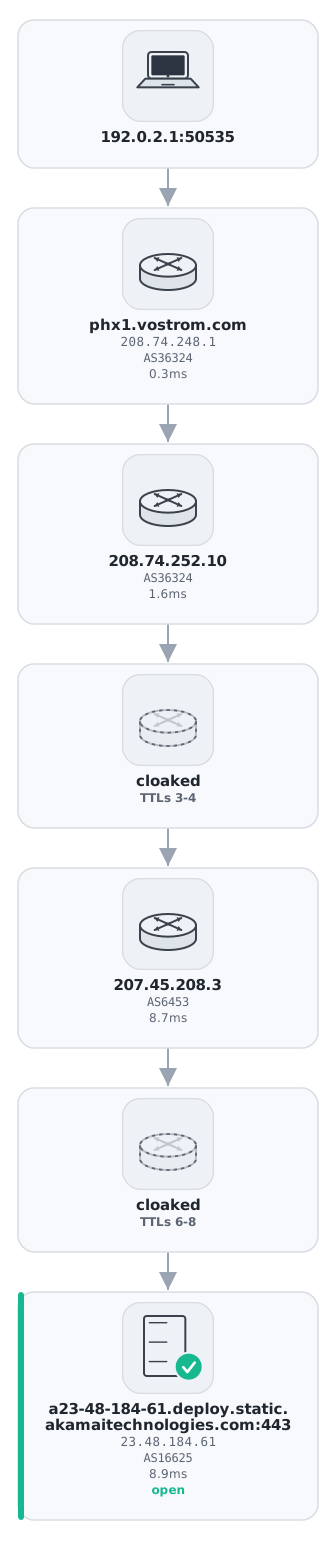
A self-contained SVG: one card per hop, device glyphs embedded as <symbol>s, long hostnames wrapped. Opens in any browser, drops into any document, needs no external files.
Drawn by LFT 4.0 on the pwhois.org server: two cloaked runs, a Tata hop, and an open Akamai edge. The source card carries a documentation-range address.
The glyph set









{
  "schema": "lft-trace", "schema_version": 1,
  "generator": "lft 4.0",
  "source": { "address": "192.0.2.1", "port": 50535 },
  "target": { "host": "eggs.gnu.org", "address": "209.51.188.92", "port": 587, "protocol": "tcp" },
  "result": { "status": "open" },
  "hops": [
    { "ttl": 1, "responders": [ { "address": "192.0.2.1", "rtt_ms": { "min": 0.4, "avg": 0.7, "max": 1.1 } } ], "firewall": null },
    { "ttl": 2, "responders": [], "firewall": null },
    …
    { "ttl": 8, "responders": [ { "address": "206.53.143.61", "hostname": "mass-ix.fsf.org", "asn": 22989, … } ], "firewall": "stateful" }
  ]
}
The lft-trace document: run metadata, source, target, result, and one object per TTL with every responder's ASN, network name and RTT statistics. Every key is always present; silent TTLs and ECMP members are explicit; compact mode is NDJSON-safe, so appending runs to a file just works.
"Within a schema version, keys are never removed or renamed and enumerations only gain values."
Shape shown; field names follow the documented schema. Pipe with confidence.
-o draws a horizontal hop diagram — one column per hop with hostname, address, ASN, network, RTT and a feature line (⇶ Stateful FW, ⚑ Flag FW, ╳ ASN Seam, ░cloaked░, [OPEN]), Unicode and color auto-detected, NO_COLOR honoured, --color/--no-color to force. -j N adds a candlestick RTT chart above it and flags hops with more than 25 ms of jitter.
--geojson (RFC 7946) and --kml (OGC KML 2.2) put located hops and great-circle segments on a map, with city, region, country, per-segment distance, RTT delta and AS change. A hop whose RTT is faster than light for its distance is kept but flagged as implausibly located — faster than light is a geolocation bug, and we say so.
--geo-color rtt colours segments green-to-red by latency; --geo-width and --geo-arc style the path. Geolocation comes from Prefix WhoIs, so -A is implied. IPv6 hops are not located.
-x is a versioned XML event stream (schema="lft-xml" schema_version="1") with host and network names escaped and sport/dport/rtt attributes. Parse by event code, not position.
text·-o·-j·-x
The report you read, the diagram you scan, the chart that shows jitter, the event stream you parse.
--svg·--mermaid·-g
Diagrams for documents and repos. All three draw ECMP diamonds with --ecmp and mark seams with --show-seams.
--json·--geojson·--kml
Schema-versioned data for dashboards; RFC 7946 and KML 2.2 for any map viewer.